header pic

BSG pic

Photo banner


Saturday, December 22, 2012

Quaint Little Cottage


Quaint Little Cottage

CC free (except for a pattern or two).

EP’s used:
base
Ambitions
World Adventures
Late Night
Pets
Supernatural
Seasons
Generations
SP’s used:
High End Loft
 Fast Lane 
Outdoor Living
Master Suite

Passes Custard

Uses the ‘Seasonal Lot Marker’.

Download:

Download and rec:


Monday, December 3, 2012

Adding Games to the DEP list


There is one or two exe's (from some EP's) that will not let you add them to the DEP list.  Those are the ones for the launcher...do not worry about adding them to the DEP list.  If you try to add them to the DEP list you will see this, 

"This program must run with data execution protection (DEP) enabled.  You cannot turn off DEP for this program."


This happens with the 'sims3launcher.exe'.  Don't worry about it, just click "ok" and move on to the next exe for that EP.


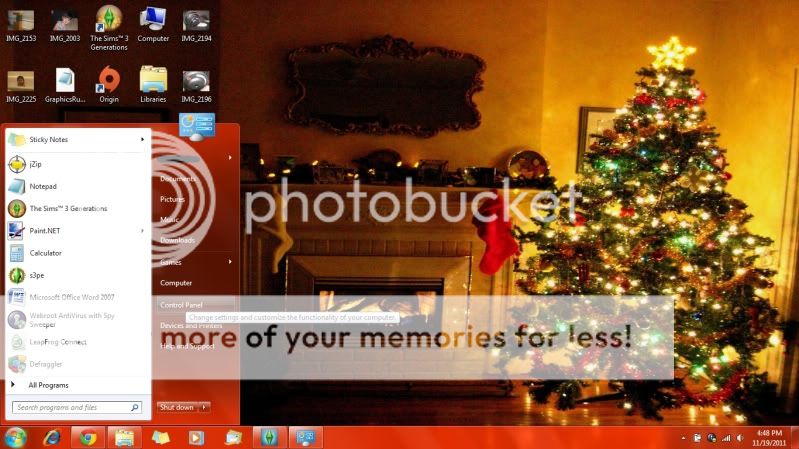
Step 1: go to start and click on "control Panel"


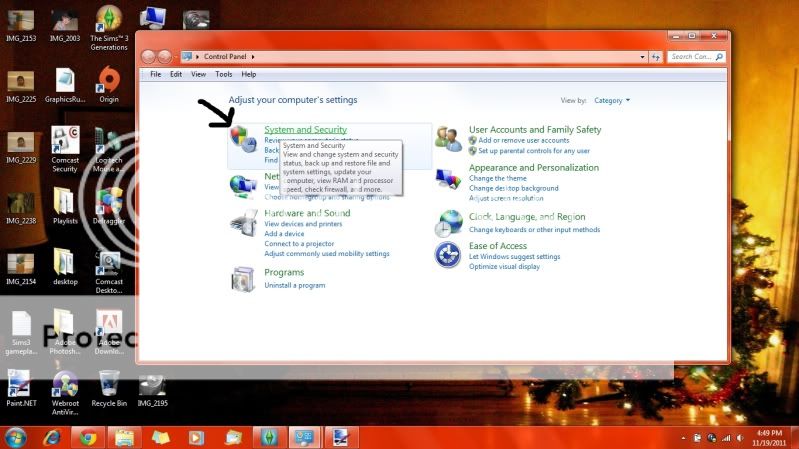
Step 2: click on "security and system" (it may say "security and maintenance" on your computer)


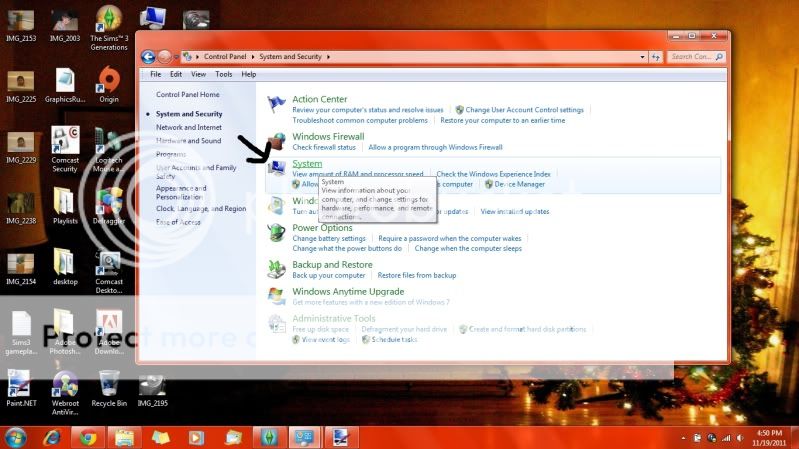
Step 3: click on "system"


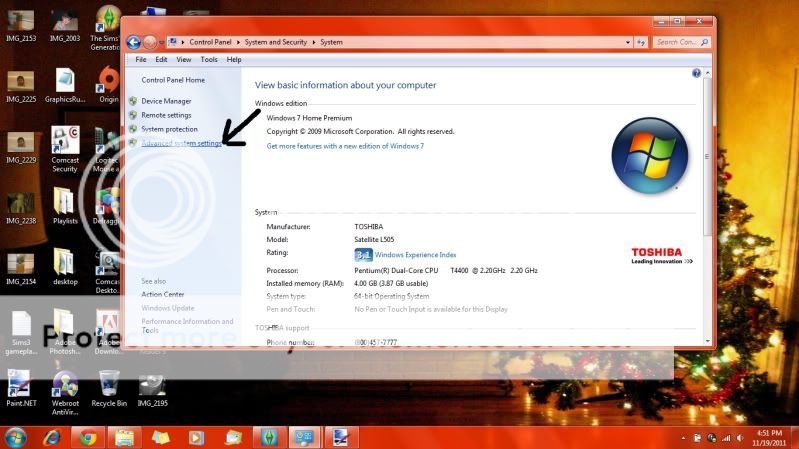
Step 4: Click on "Advanced System Settings"


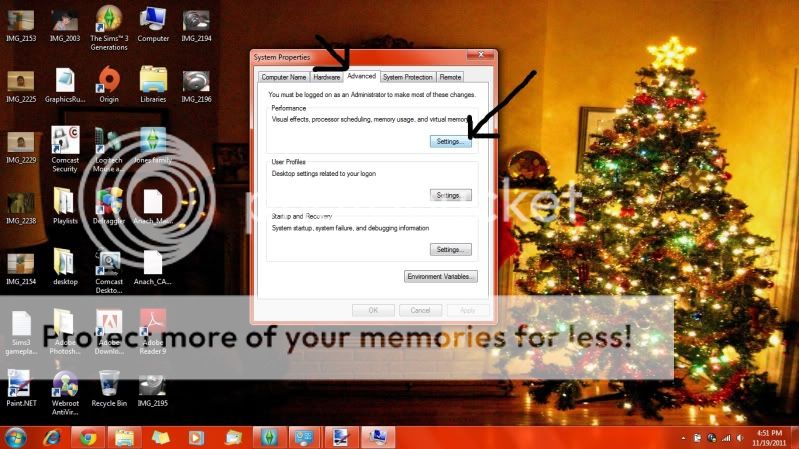
Step5: click on the tab at the top that says "Advanced" then under "Performance" click on "settings"


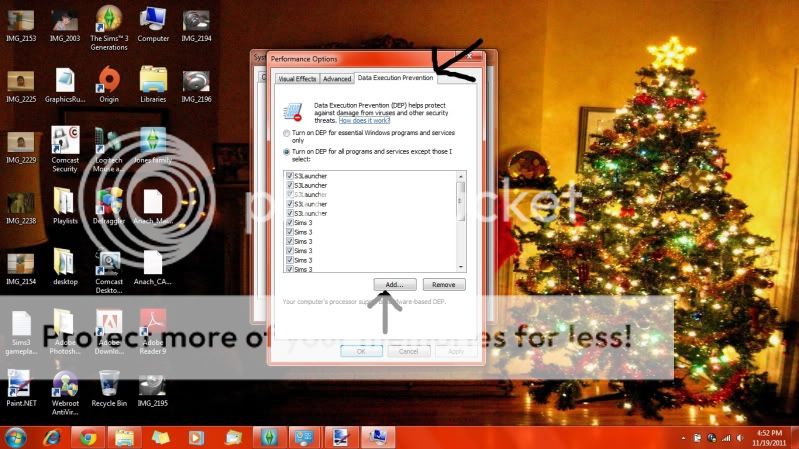
Step 6:this will bring up the Performance options, click on the tab that says  "Data Execution Prevention", then "add"
(your DEP box will most likely be empty/blank if you've never done this before)

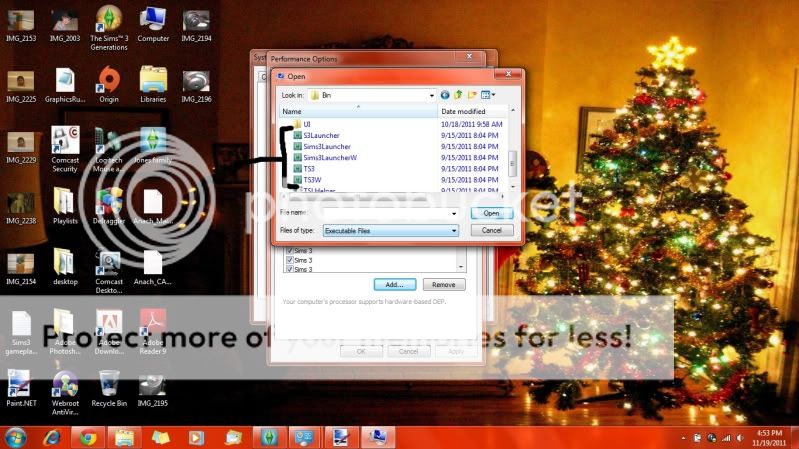
Step 7: for this step you need to go to where you install your games, usually in either Program Files or Program Files (x86)...so follow this path C drive>program files (or program files (x86))>Electronic Arts> The sims 3>Game>Bin from the drop down option where it says "look in".  Once in "bin" scroll down until you will see these:

Click on all of those that are with the plumbob icon and click "Open" (you may have to do this one at a time).  It will take you back to the "data execution prevention screen".  Keep clicking "Add" and following steps 6 & 7 until you have all the "plumbob" (exe) icons from the base game and any/all EP's you own are added to the DEP list.

Example: if you have Ambitions, do everything up to step 7, but instead of going to the sims 3 folder>Game>Bin you will go to the Ambitions folder>Game>Bin:

C drive>program files (or ""(x86))>Electronic Arts>the Sims 3>Ambitions>Game>Bin

Add all the exe files to the list. When you have all of the games added to the DEP list, make sure you click "Apply" at the bottom of the DEP list (next to "ok"..."Cancel"..."Apply").   As you can see from step 6, they are all going to say Sims 3 regardless of what EP you've added, so you'll have to keep tabs on which ones you add and which ones you need to add.


Hope this helps!

Wednesday, October 24, 2012

Sunset Cove

Sunset Cove

4 bedrooms (1 nursery), his/her bath, private baths, 1/2 bath, full sized kitchen, breakfast nook, outdoor kitchen, large pool, fire pit lounging, indoor pool shower room, laundry room, 3 car garage, bar, nectar walk-through closet, mud room, extra room/space to expand, high ceiling, office (could easily be turned into 5th bedroom), dining room


Office


Dining Room

Kitchen

Breakfast Nook

Living Room

Half Bath


Laundry Room


Guest Room


Master Bedroom


"Her" bathroom


"Her" walk-in closet

Children's Bedroom/private bath


 Nursery

 Fire-pit Lounge

Outdoor kitchen


Outdoor Dining

Pool

Indoor pool bath 

Level 1 layout

Level 2 layout


Download


Friday, October 12, 2012

Miranda Frey


Miranda Frey


Un-edited pic of her headshot. 


All CC has been checked prior to going on my sims, but once again, that invisible "corrupt" file has shown it's ugly head.  I've gone through all my CC (both package and sim3pack) and nothing comes back "corrupt".  So you've been warned.


CC List
SKIN: Skin F1.0 by S-Club
http://mysims3blog.blogspot.com/2012/04/skin-f10-by-s-club.html

HAIR: Savio's Stuff
http://saviostuff.blogspot.com/2010/06/peggy-0037.html


EYESHADOW: GOSIK-envy me eyeshadow
http://mysims3blog.blogspot.com/2012/04/envy-me-eyeshadow-by-gosik.html

EYELILNER: set (FIERCE) by emmzx
http://www.modthesims.info/download.php?t=399978

BLUSH: SWOOP LADYFRONTBUM
http://www.modthesims.info/download.php?t=410791

CONTACTS: MISS L'S BREYETE FANTASY AND REALISTIC
http://breyetesims.blogspot.com/2011/05/miss-l-eye-makeup-set-realistic-eyeball.html

CORSET: HELLBUNNY by Elexis
http://www.modthesims.info/download.php?t=482351

SKIRT: ALL ABOUT STYLE-Bustle Skirt
http://www.all-about-style.com/Sims3hist_female.html

GLOVES: LORANDIASIMS3
http://www.lorandiasims3.com/moreviews.php?cat=accessories&id=115

EYEBROWS: ACE CREATIONS-heavensent-curved eyebrows by elexis
http://acecreators.blogspot.com/2012/08/heavensent-curved-eyebrows-by-elexis.html

SHOES: "BOW TIE" FANCIFUL FASHIONS AND HAIRSTYLES
http://store.thesims3.com/setsProductDetails.html?productId=OFB-SIM3:19273&categoryId=11488&scategoryId=12307&pcategoryId=12306&ppcategoryId=12857

DRESS: all about style-Gown With Roses
http://www.all-about-style.com/Sims3adult_fefor2.html

SLIDERS:
TWALLANS MASTER CONTROLLER
http://nraas.wikispaces.com/MasterController

CHIN WIDTH (MTS)
http://www.modthesims.info/d/463699

Download